
Introduction — Why Creating Strong Passwords Is More Important Than Ever 🔐
In today’s hyper-connected digital world, your password is the key to your most valuable online assets — emails, bank accounts, social media profiles, and even your personal identity.
Yet, thousands of people still use shockingly weak passwords like “123456” or “password123,” leaving their data dangerously exposed to hackers and cybercriminals.
Knowing how to create strong password combinations is no longer a luxury — it’s an essential digital survival skill.
This blog post will guide you step-by-step on how to create secure passwords that are both difficult to crack and easy to remember.
You’ll also discover expert-level password tips, modern strategies for remembering complex codes, and how a password manager can streamline your online life without sacrificing security.
Whether you’re managing one account or a hundred, understanding how to build stronger passwords can dramatically reduce your risk of being hacked.
Most importantly, we’re not just going to tell you what a strong password looks like — we’ll show you practical frameworks and proven techniques to actually remember them without writing them down or reusing them across platforms.
🔎 Key Stats to Think About:
- 💥 Over 80% of data breaches are caused by weak or reused passwords (Verizon DBIR 2024).
- 🔐 Nearly 60% of internet users reuse the same password across multiple accounts.
- 🚨 Cyber attacks are up by over 30% in the past year, making secure password habits even more critical.
If you’ve ever felt overwhelmed trying to keep up with complex login credentials, you’re not alone.
The good news is — there’s a better way.
This guide breaks it all down for you, using a conversational tone and real-life tips to make it not just informative, but easy to follow.
You’ll learn what makes a password strong, how to generate them instantly using tools or memory tricks, and the best way to store them without ever compromising your privacy.
And yes, we’ll even bust some common myths along the way.
So if you’re tired of resetting your passwords every few weeks — or worse, feeling insecure online — keep reading.
Because by the end of this post, you’ll have a powerful password strategy that works for you — not against you.
🎯 In This Guide, You’ll Learn:
- ✅ How to create strong password combinations that are easy to remember
- ✅ Why using a password manager is a game changer
- ✅ Tips to avoid common password mistakes
- ✅ Step-by-step strategies to build secure passwords that hackers can’t guess
- ✅ Real-world examples and memory hacks you can apply instantly
💡 Pro Tip: Strong passwords don’t have to be random strings of nonsense. We’ll teach you smarter, easier, and faster ways to create strong passwords you’ll never forget.
🔥 Ready to finally lock down your digital life the right way?
Let’s dive in and take control of your online security once and for all.
Why Strong Passwords Matter in 2025 and Beyond 🔒
In a world where almost every aspect of our lives has gone digital — from online banking to cloud photo storage — protecting your accounts with strong passwords isn’t just smart, it’s absolutely critical.
Every time you sign up for a new service, create a social media account, or shop online, you’re creating a new door into your personal world.
And that door is only as strong as the password guarding it.
Unfortunately, cybercriminals are evolving just as fast — if not faster — than the average user’s security habits.
They’re using automated tools, brute force attacks, and even AI to guess weak passwords in seconds.
That’s why learning how to create strong passwords is no longer optional.
It’s the first and most important line of defense between your private data and today’s sophisticated cyber threats.
🛡️ Weak Passwords Are the #1 Cause of Account Hacks
According to the 2024 Cybersecurity Trends Report, 81% of hacking-related breaches occur because of weak or reused passwords.
These are the kind of passwords we’ve all been guilty of using at some point:
- Names of loved ones (e.g., “Jessica123”)
- Keyboard patterns (e.g., “qwerty” or “asdfgh”)
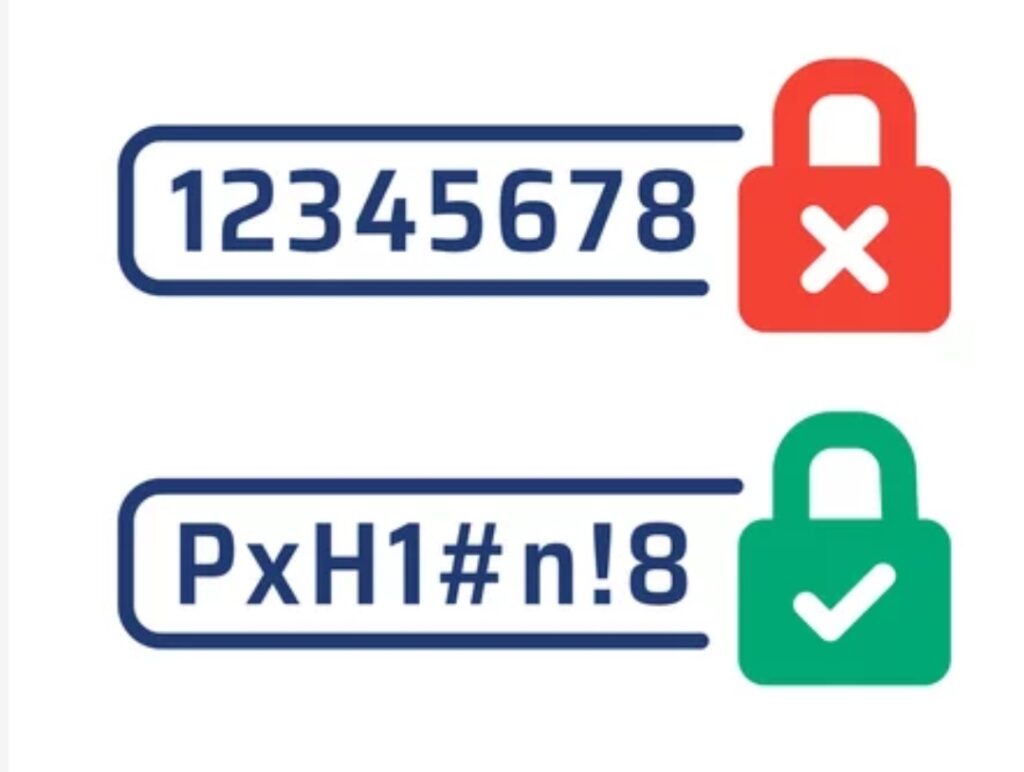
- Common sequences (e.g., “12345678”)
- Passwords reused across multiple accounts
The problem?
Hackers know these patterns — and their bots are programmed to try them first.
Once they break into one of your accounts, they can often access many more if you’ve reused the same login.
This creates a domino effect, and in minutes, your entire digital footprint can be compromised.
🧠 Why Most People Still Use Easy-to-Guess Passwords
Let’s be honest.
Creating a new, complex password for every site can feel exhausting.
Remembering them all? Even worse.
That’s why so many people still rely on simple passwords — or worse, one universal password for everything.
But in 2025, that strategy is simply too risky.
If you struggle with this, you’re not alone.
But the good news is — using tools like a trusted password manager can solve this problem instantly and securely.
It allows you to create long, unguessable passwords without having to memorize them all.
🔍 What Are Hackers Really After?
When hackers break into accounts using weak credentials, it’s not just about fun or mischief.
They’re after valuable data:
- Bank information and credit cards
- Access to your email for phishing
- Identity theft opportunities
- Access to your business accounts or cloud storage
- Blackmail or ransomware threats
And it all starts with one cracked password.
This is why secure passwords act like digital vaults — and every character you add makes your vault harder to break into.
🔐 The Cost of a Breach Is Higher Than You Think
- 💸 The average cost of a personal data breach is over $4,500 per person
- 🕒 Recovering from identity theft can take months or even years
- 🧾 Victims often deal with credit score damage, loan rejections, and stress
So ask yourself — is that five minutes saved on a weak password worth years of fallout?
Absolutely not.
That’s why following practical password tips, and making use of modern tools like a reliable password manager, is the smartest move you can make today.
📢 Passwords Aren’t Just Security, They’re Your Digital Identity
Think of your password like your house key — would you leave it under the mat?
Of course not.
Yet millions do the digital equivalent every single day.
If you’ve been using the same password since high school or using “password123” as a placeholder — it’s time to level up.
Because a strong password isn’t just a security feature — it’s your identity safeguard, privacy shield, and peace-of-mind solution.
👉 Take action now — audit your current passwords and replace any weak ones before it’s too late.
Don’t wait until your account is compromised. Start building stronger, smarter passwords today and protect your digital life like a pro. Use a password manager to get started effortlessly.
What Makes a Password Strong? 💪 (And Why It’s Easier Than You Think)
Creating a strong password may sound complicated, but once you understand the core elements, it becomes a repeatable system that you can use again and again.
If you’ve ever asked yourself, “What exactly makes a strong password?” — you’re about to find out.
A strong password is one that is long, random, complex, and unique to each account you use.
But here’s the twist: a secure password doesn’t have to be a confusing jumble of characters that you’ll forget in a week.
With the right approach, you can generate secure passwords that are not only hacker-proof but also human-friendly.
Let’s break it down step-by-step.
🧬 The Four Core Elements of a Strong Password
To ensure your password is as secure as possible, it should include the following characteristics:
1. Length Matters — Go for 12+ Characters
Short passwords are easier to guess or crack using brute force tools.
Aim for at least 12 characters, and ideally more.
Longer passwords take exponentially more time for bots to crack.
For example:
- A 6-character password can be cracked in seconds.
- A 12-character password with complexity can take centuries.
2. Use a Mix of Character Types
Your password should include a mix of:
- Uppercase letters (A-Z)
- Lowercase letters (a-z)
- Numbers (0-9)
- Special symbols (!@#$%^&*)
This makes it exponentially more difficult for attackers to guess or brute-force your login.
Example: Blue$Guitar!92 is way stronger than blueguitar92.
3. Make It Random, Not Personal
Avoid using any personal information:
- Your name or birthday
- Pet names
- Favorite band
- Phone numbers
- Common phrases
Hackers often use public data and social engineering to guess these quickly.
Instead, create nonsense combinations or use phrases only you would understand.
4. Uniqueness Is Non-Negotiable
This is where many people slip.
You must use a different password for each account — especially for sensitive platforms like email, banking, and cloud storage.
That way, if one account gets compromised, the rest remain safe.
✅ Pro tip: A password manager makes this painless — it stores and autofills your passwords so you don’t have to remember them all.
🧠 But What If I Can’t Remember Strong Passwords?
Let’s face it — memorizing random strings like F@x9#Trw&cP7 isn’t realistic for most people.
Luckily, there are memory-friendly methods to build secure passwords you’ll actually remember:
Use the Passphrase Method 🔐
Instead of thinking in characters, think in phrases.
Example:
- “MyDogEats$PizzaOnTuesdays”
✅ Easy to remember
✅ Over 20 characters
✅ Includes symbols and capital letters
You can even turn phrases into acronyms:
- “I loved traveling to Paris in 2022!” → ILttPi22!
That’s memorable, long, and complex — the ultimate password combo.
💡 Bonus Tips to Supercharge Your Password Security
- Avoid Dictionary Words: Hackers use dictionary attacks. Don’t make it easy.
- Don’t Repeat Patterns: Using Password1, Password2, etc., is a big no.
- Avoid Keyboard Walks: Like qwerty or asdfghjkl — easily guessed.
- Watch Out for Substitutions: Pa$$word is not much better than Password.
⚠️ Examples of Weak vs. Strong Passwords
| ❌ Weak Password | ✅ Strong Password |
| password123 | Coffee!Run$91Lake |
| qwerty | 5Stars&GreenRoad |
| john1988 | My!Travel$ToMars2025 |
| iloveyou | JumpsOver#7LazyDogs |
| adminadmin | SkyLine_Pink!Ball89 |
Notice the difference? Strong passwords are longer, mixed, and unpredictable.
🛠️ Create Strong Passwords Automatically with a Password Manager
Feeling overwhelmed?
Don’t be.
Most password manager apps can generate highly secure passwords instantly — and remember them for you.
They also auto-fill your credentials when needed and alert you if a password has been exposed in a data breach.
Highly recommended tools include:
- Bitwarden 🔐 (Free + Premium options)
- 1Password 🛡️ (Excellent UI + Family sharing)
- Dashlane ⚡ (Easy setup + Dark web monitoring)
- LastPass 🧩 (Popular + Multi-device sync)
These tools are especially helpful if you have dozens of accounts (like most of us do).
✅ Strength = Simplicity + Strategy
To summarize:
A strong password doesn’t have to be hard to remember — it just needs to be created with intention.
Use the rules above.
Leverage passphrases or a password manager.
Most importantly, don’t reuse passwords, no matter how strong they seem.
Every login is a potential entry point for attackers.
So secure it like your life depends on it — because online, it kinda does.
Now is the perfect time to create your ultimate password strategy. Use our tips above or generate your own strong passwords using a trusted password manager. Your digital safety starts with your next login.
Don’t risk it — lock it down!
Password Tips to Make Them Memorable 🧠✨ (Without Sacrificing Security)
By now, you know the importance of using secure passwords.
But let’s face it — the hardest part for most people isn’t creating strong passwords…
It’s remembering them.
If you’ve ever written down passwords on sticky notes, used the same password for multiple sites, or hit “Forgot Password” more times than you can count — you’re not alone.
The truth is: a strong password is only effective if you can actually recall it when needed.
That’s why in this section, you’ll discover simple but powerful password tips to help you build ultra-secure passwords that are hard for hackers to guess — but easy for you to remember.
Let’s dive in.
💡 Use the “Passphrase” Technique for Easy Recall
Instead of using a random series of letters, numbers, and symbols, try turning a simple sentence into a password.
This method is recommended by top cybersecurity experts because it’s easy to recall and very difficult to crack.
🔑 Example:
“My first car was a red Honda in 2009!”
Becomes → My1stCar=RedHonda2009!
Why this works:
- It’s long (18+ characters)
- It has capital letters, numbers, and symbols
- It’s memorable to you, but nonsensical to others
🧩 Use a Pattern That Makes Sense to You (But No One Else)
Some people use patterns or phrases that connect to specific memories.
Think of something you’ll never forget — like a vacation, book quote, or food combo.
Then mix it with symbols and numbers.
🎯 Example:
“I love Korean BBQ in Seoul 3 times a year!”
Becomes → KBBQ@Seoul3x!
It’s specific, easy to visualize, and completely unique.
🧠 Build a Personal Password Formula 🔄
Create your own formula or framework so that you can build unique passwords for every website — while still remembering the structure.
🔍 Example Formula:
FavoriteWord + SiteInitials + Year/Number + Symbol
So for Facebook:
CoffeeFB2025#
For Gmail:
CoffeeGM2025#
Each password is different but follows a structure only you know.
Important: This is a great way to retain uniqueness while still using mental shortcuts.
Just don’t use the same format for everything without variation.
🧠 Use Acronyms and Mnemonics That Only You Understand
Pick a favorite sentence, lyric, or inside joke and use just the first letters.
🎵 Example:
“Every good boy deserves fudge” becomes → Egbdf!2025
Add a number and a special symbol to make it even stronger.
You’ll remember the phrase, but the password looks totally random.
📚 Associate Visual Images With Your Passwords
Our brains remember images more easily than characters.
So when you create a password, visualize it.
Example:
Bunny#Eats3Carrots!
You picture a bunny munching on 3 carrots — and boom, it sticks.
This is known as the “method of loci”, or memory palace trick, and it’s crazy effective.
🚫 Common Mistakes When Trying to Make Passwords Memorable
Avoid these habits that make your passwords predictable and easy to hack:
- ❌ Using your birth year (e.g., 1990, 2000)
- ❌ Relying on your pet’s name
- ❌ Using your own name or initials
- ❌ Adding “123” or “abc” at the end of everything
- ❌ Repeating the same word twice (e.g., BananaBanana!)
Hackers use these common patterns in dictionary and brute-force attacks.
Remember: If it’s easy for you to remember without any strategy, it’s probably easy for a hacker too.
🔐 Use a Password Manager to Remember for You (and Save Your Brainpower)
Let’s be real — even with all these memory tricks, managing 50+ passwords across different sites is no joke.
That’s where a trusted password manager becomes your digital brain.
These tools store and encrypt your login credentials so you don’t have to remember every single one.
They can even generate strong passwords for new accounts with just one click.
🛠️ Top Features of Password Managers:
- 🔐 Secure cloud-based vault
- 📲 Auto-fill login fields across websites & devices
- 🔄 Password health checks & breach alerts
- 🧩 Cross-platform syncing
- 🧠 One master password to rule them all
Popular options include:
- Bitwarden (free + open-source)
- 1Password (super user-friendly)
- Dashlane (includes VPN and dark web monitoring)
🧠 Bonus Hacks to Strengthen Your Memory of Passwords
- 📝 Create a non-obvious hint system for yourself (never write full passwords down)
- 🎤 Say your password out loud as a rhythm or melody
- 🧠 Use spaced repetition (think of it like flashcards)
- 🎨 Associate passwords with vivid mental images or stories
✅ You Can Remember Strong Passwords Without Struggling
Let’s wrap this up:
You don’t have to choose between security and convenience.
With a few smart techniques — like passphrases, acronyms, personal formulas, and password manager tools — you can create and remember strong passwords with total ease.
Don’t underestimate the power of small changes.
These password tips might seem simple, but they can be the difference between staying safe and getting hacked.
👉 So why wait?
Start updating your weak, forgettable passwords today and replace them with smart, secure ones you’ll never forget.
Make your digital life stress-free starting now. Use our expert password tips or download a password manager to generate and remember secure passwords effortlessly. Your future self will thank you.
Use a Password Manager for Better Security 🛡️📱
Let’s be honest — memorizing dozens (or even hundreds) of strong, unique passwords isn’t just challenging…
It’s practically impossible.
That’s where a password manager comes in — the unsung hero of modern digital security.
If you’re serious about learning how to create strong passwords and actually managing them without stress, then this is the one tool you absolutely need.
In this section, you’ll learn why a password manager is crucial, how it works, and which tools are best for every type of user — whether you’re a student, business owner, or busy parent.
🔐 What Is a Password Manager? (And Why You Need One)
A password manager is a secure application that helps you:
- Generate strong, unique passwords
- Store them safely in an encrypted vault
- Auto-fill login fields across websites and apps
- Access all your credentials with just one master password
It’s like a digital safe — but instead of keeping money, it protects your logins, credit card numbers, and sensitive data.
The best part?
You only need to remember one strong password: your master password.
The rest is handled automatically.
✅ Top Reasons to Use a Password Manager (Backed by Cybersecurity Experts)
Still wondering if it’s worth it?
Here are 7 undeniable reasons why using a password manager is a game-changer for your online safety:
- 🔒 Secure Storage – All your passwords are stored in an encrypted vault that even the company can’t access.
- 🔄 Unique Passwords for Every Site – It generates a different password for every account to avoid password reuse.
- 📲 Cross-Device Sync – Access your logins on all your devices — phone, tablet, desktop — instantly.
- 🚨 Breach Alerts – Get notified if a site you use is hacked, so you can change your password ASAP.
- 🔐 Two-Factor Authentication Support – Many password managers integrate with 2FA for extra protection.
- ⏱️ Saves Time – No more forgotten passwords, failed login attempts, or constant resets.
- 🔍 Audits Your Passwords – Check for weak, reused, or compromised passwords in your current vault.
🛠️ Best Password Manager Tools in 2025 (Free + Paid Options)
Here’s a quick comparison of the top-rated password managers trusted by millions:
| Password Manager | Best For | Features | Pricing |
| Bitwarden 🔐 | Best Free Option | Open-source, secure vault, cross-device sync | Free / Premium |
| 1Password 🛡️ | Best for Families & Teams | Clean UI, secure sharing, dark mode, Watchtower | Paid only |
| Dashlane ⚡ | Best for Beginners | VPN, password health reports, breach monitoring | Free / Premium |
| Keeper 📦 | Best for Business Security | Biometric login, encrypted file storage | Paid only |
| NordPass 🔒 | Best UI + Performance | Ultra-fast syncing, data breach scanner | Free / Premium |
All of these tools use military-grade AES-256 encryption, meaning your passwords are virtually impossible to crack — even if someone gained access to the servers.
⚙️ How to Use a Password Manager (Step-by-Step Guide)
Here’s how to get started in just a few minutes:
🔧 Step 1: Choose Your Password Manager
Pick one based on your needs — Bitwarden is great for beginners, while 1Password is excellent for families.
🔧 Step 2: Create Your Master Password
This should be your strongest password ever — long, complex, and 100% unique.
Example: Green$Sky_4MyEyesOnly!
💡 Tip: Never reuse this password or share it with anyone.
🔧 Step 3: Import or Add Your Logins
You can import passwords from browsers or add them manually as you log in to your accounts.
🔧 Step 4: Enable Autofill + Two-Factor Authentication
Make logging in fast and secure.
Most password managers have browser extensions and mobile apps with face or fingerprint login.
🔧 Step 5: Start Generating Secure Passwords
Use the built-in password generator to create random, hacker-proof passwords for every new site.
Example: B8^xGm9z#Pq1!VkE
You’ll never have to remember it — your password manager does that for you.
⚠️ Is It Safe to Trust a Password Manager?
Yes — when you use a reputable provider, password managers are far more secure than storing passwords in your browser or writing them down.
Here’s why:
- They use zero-knowledge architecture, meaning not even the provider can see your data.
- They offer biometric logins, 2FA, and end-to-end encryption.
- Your vault is only unlocked locally, on your device, after you log in.
Even if the company gets hacked, your encrypted data stays safe — because the key to unlock it only exists on your end.
🧠 Don’t Wait Until You Get Hacked — Act Now
Too many people only start thinking about password security after their accounts are breached.
Don’t be one of them.
A password manager is the easiest and most effective way to:
- Protect your online identity
- Save time
- Stay in control of your data
And it only takes a few minutes to set up.
Your future self will thank you.
Tired of forgetting passwords or stressing over security? It’s time to take control. Choose a trusted password manager today and secure your digital life the smart way.
Common Password Mistakes to Avoid ❌🛑 (And What to Do Instead)
Even with the best intentions, many people unknowingly sabotage their digital security by making basic password mistakes.
These missteps leave your online accounts vulnerable — even if you think your password is “pretty strong.”
So if you’re serious about learning how to create strong passwords, avoiding these common errors is just as important as following the right password tips.
This section highlights the most frequent mistakes people make when creating, managing, or storing passwords — and offers actionable solutions for each.
Let’s fix these before hackers take advantage.
🚫 Mistake #1 — Reusing the Same Password Across Multiple Accounts
This is by far the most dangerous and most common mistake.
Why?
Because once a hacker breaches one account (like your Netflix or email), they’ll use that same password on other major platforms — including your bank or social logins.
This tactic is called “credential stuffing”, and it works frighteningly well.
💣 One leak can unlock your entire digital life.
✅ Solution:
Use a unique, strong password for every account — especially sensitive ones like email, financial accounts, and cloud storage.
💡 Tip: A password manager makes this effortless by storing all your different logins in one secure vault.
🚫 Mistake #2 — Using Personal Information That’s Easy to Guess
Passwords based on names, birthdays, phone numbers, or pets may be easy to remember — but they’re also easy to hack.
Cybercriminals often scrape your personal data from social media to guess your login credentials.
So if your password is something like:
- Jessica1994
- Tommy123
- JohnDoe!
…you’re making a hacker’s job way too easy.
✅ Solution:
Avoid anything tied to your identity.
Instead, use passphrases, acronyms, or completely random words with symbols and numbers.
Example: Blue$Galaxy!OnMars91
🚫 Mistake #3 — Using Short or Simple Passwords
Short passwords like abc123, qwerty, or even iloveyou can be cracked by brute force in less than a second.
Hackers use automated tools to run through common passwords — and guess what?
These easy ones are always at the top of their list.
✅ Solution:
Aim for passwords that are at least 12–16 characters long, with a mix of:
- ✅ Uppercase and lowercase letters
- ✅ Numbers
- ✅ Special characters
Use a password generator to instantly create strong combinations.
🚫 Mistake #4 — Writing Passwords Down on Paper or Saving in Plain Text
Whether it’s a sticky note under your keyboard or a notepad file called “MyPasswords.txt” on your desktop…
Writing down your passwords without protection is a major security risk.
Anyone with access to your physical space — or your computer — can steal your entire digital life.
✅ Solution:
Use a trusted password manager to store all your credentials safely and encrypted.
Never write your passwords down — not even for backup.
If you must, write a hint, not the actual password.
🚫 Mistake #5 — Slight Variations of the Same Password
Think using Password1, Password2, and Password3 is clever?
Hackers can and will guess that pattern.
These small tweaks offer no real security benefits.
✅ Solution:
Every password should be completely different and unrelated.
Using formulas like:
Phrase + PlatformInitials + Symbol/Year can help you stay unique while maintaining memorability.
Example:
- For Gmail: CoffeeGM2025!
- For Instagram: CoffeeIG2025!
It’s better — but still avoid using the exact same structure everywhere.
🚫 Mistake #6 — Ignoring Password Updates After a Breach
If a service you use experiences a data breach, and you don’t change your password — you’re giving hackers a free pass to your account.
Unfortunately, many users ignore security notifications.
✅ Solution:
Subscribe to alerts via services like:
- HaveIBeenPwned.com
- Firefox Monitor
- Your password manager’s data breach alerts
When you hear about a breach, change your password immediately — and make sure it’s completely different from the old one.
🚫 Mistake #7 — Relying Only on Your Browser to Remember Passwords
Yes, browsers like Chrome or Safari can save your passwords — but they’re not designed for secure password management.
They often lack proper encryption, breach monitoring, and don’t always sync safely across devices.
Worse, if someone accesses your browser while you’re logged in — your passwords could be fully exposed.
✅ Solution:
Use a dedicated password manager like Bitwarden or 1Password, which offers:
- 🔐 AES-256 encryption
- 📲 Biometrics + 2FA
- 🔄 Secure syncing
- 🔍 Password health reports
✅ Stop Making These Mistakes Today
It doesn’t matter how strong your password is — if you’re using it the wrong way, you’re still vulnerable.
✅ Don’t reuse passwords.
✅ Don’t use personal info.
✅ Don’t rely on sticky notes or browser autofill.
The key to digital safety is awareness + action.
You don’t need to be a cybersecurity expert — just avoid these simple but dangerous mistakes, and use a password manager to automate your protection.
Fix your password habits now — before a hacker finds the hole in your security. Audit your passwords today, avoid these common mistakes, and let a trusted password manager do the heavy lifting.
Bonus — How to Create a System for Unique Passwords 🔄🧠 (That You’ll Never Forget)
Let’s be real — even if you know how to create strong passwords, applying that every time you sign up for a new account can feel overwhelming.
That’s where having a repeatable password system becomes your secret weapon.
Instead of inventing a completely random password for every site, you can build a personalized system that creates unique, secure passwords — yet follows a pattern only you understand.
This method blends security with simplicity and works perfectly with or without a password manager.
🧩 What Is a Password System (And Why You Need One)?
A password system is a custom rule or framework that helps you generate different passwords for each website based on a formula.
The result?
- ✅ Unique passwords for every login
- ✅ Easier to remember without writing anything down
- ✅ Practically unguessable by hackers or bots
It keeps your logins safe while taking the pressure off your memory.
⚙️ Step-by-Step — Build Your Own Password System
Here’s a simple 3-part system you can start using right now:
Step 1 – Choose a Personal Base Phrase
Pick a word or phrase that only you would understand.
It could be:
- A hobby: DrumKit
- A memory: ParisTrip
- An inside joke: SpacePizza
- A custom string: C0ffee4Me
This will act as your root phrase.
💡 Tip: Include a mix of letters, numbers, or special characters.
Step 2 – Add Site-Specific Letters
Next, add 2–4 letters that refer to the platform or website you’re logging into.
Examples:
- Gmail → GM
- Netflix → NF
- Amazon → AMZ
- TikTok → TT
This adds uniqueness for each site — even if your base stays the same.
Step 3 – Add a Number or Symbol Pattern
Finally, finish with a consistent pattern of numbers, symbols, or uppercase/lowercase styling.
Examples:
- !25
- @2025
- *Xx
- #99
This makes your password even stronger — and still predictable only to you.
🧠 Example Password System in Action
Let’s say your custom base phrase is GreenSky, and your ending is #91.
Now apply this to 3 platforms:
| Website | Custom Password |
| Gmail | GreenSkyGM#91 |
| Netflix | GreenSkyNF#91 |
| TikTok | GreenSkyTT#91 |
Each password is:
- ✅ Unique
- ✅ Easy to remember
- ✅ Strong enough to resist brute force
Just never share your base phrase or pattern with anyone — it’s your personal key.
💣 Warning — Don’t Overuse Simple Patterns
Some users take the system idea too far and create predictable patterns, like:
- MyPasswordFB2023
- MyPasswordIG2023
While unique, these are easy to guess.
To stay safe:
- Don’t use real words like “password”
- Add complexity with symbols and numbers
- Avoid sharing your system even with friends
✅ The goal is a hidden logic that only you understand.
🔐 Pro Tip — Combine Systems with a Password Manager
Want ultimate flexibility?
Use your manual system for low-stakes accounts (like forums or shopping apps) — and let a password manager handle the complex, ultra-random passwords for:
- Banking apps
- Email accounts
- Cloud storage
- Social media
That way, you get the best of both worlds:
- Human memory for casual use
- Machine-level strength for high-risk logins
📌 Benefits of Creating a Password System
- 🧠 Easy to remember without writing anything down
- 🔄 Always unique for each platform
- ⛓️ Harder to crack than reused or predictable passwords
- 💡 Can be layered with a password manager for advanced security
✅ A Smart System Is Better Than a Smart Guess
You don’t have to reinvent the wheel every time you need a password.
By building your own password generation system, you’re setting up a consistent, secure, and stress-free approach to managing your digital identity.
Whether you use a password manager, memory tricks, or both — a system is the bridge between strong password practices and everyday usability.
👉 Don’t wait until you’re locked out (or hacked) to take control.
Start building your password system now. It’s simple, secure, and stress-free. Combine it with a password manager and enjoy peace of mind — no sticky notes or guesswork ever again.
FAQs About Creating Secure Passwords ❓🔐 (Quick Answers to Common Password Questions)
Even with all the tips and tools out there, most people still have burning questions when it comes to passwords.
And that’s totally normal.
Whether you’re trying to improve your account security, debating the use of a password manager, or just wondering what counts as “strong” — this section clears up the confusion.
Let’s answer the most frequently asked questions about how to create strong passwords, secure password habits, and modern best practices.
❓ What is the best way to create a strong password in 2025?
The most secure way to create a password is by combining length, complexity, and uniqueness.
Follow this checklist:
- ✅ At least 12–16 characters long
- ✅ Includes uppercase + lowercase letters
- ✅ Includes numbers and special characters
- ✅ Completely random or based on a private passphrase
- ✅ Unique for each account
Pro Tip: Use a password generator built into your password manager to instantly create strong, unguessable passwords.
❓ How can I remember strong passwords without writing them down?
Use the passphrase method, acronyms, or memory triggers.
Examples:
- Phrase: “My dog eats ice cream on Sunday” → MdeicoS!2025
- Visual: Picture “PurpleElephant#94” in your head
- Formula: BasePhrase + WebsiteInitials + Year → CactusAMZ#2025
And for best results? Use a password manager so you don’t have to remember them all.
❓ Is it OK to write my passwords in a notebook?
📓 While better than using weak or reused passwords, writing them on paper is still not recommended.
Anyone who finds it can access your entire digital life.
✅ A more secure alternative:
Use a password manager to store and encrypt all your logins securely, accessible only with your master password.
❓ Are password managers really safe?
Yes — trusted password managers are one of the most secure ways to protect your credentials.
They use:
- 🔐 AES-256 bit encryption
- ✅ Zero-knowledge architecture (only you can see your data)
- 📲 Biometrics and 2FA support
Even if their servers were hacked, your data would remain encrypted and unreadable.
Use tools like:
- Bitwarden
- 1Password
- Dashlane
- Keeper
❓ How often should I change my passwords?
Change your passwords:
- 🆘 Immediately after a data breach or suspicious login
- 🔄 Every 6–12 months for sensitive accounts (bank, email)
- ✅ Whenever you feel a password may be weak or reused
Pro Tip: Your password manager can notify you of compromised passwords and suggest which ones to update.
❓ What are the most common weak passwords to avoid?
Avoid anything on the top 100 most-used passwords list.
These include:
- 123456
- password
- qwerty
- abc123
- iloveyou
- admin
- letmein
💥 These are instantly cracked by hacker bots.
Instead, use passphrases or random characters, and never reuse passwords across accounts.
❓ Should I use the password suggestions from browsers like Chrome or Safari?
While browser-suggested passwords are generally strong, storing them in the browser can be less secure than a dedicated password manager.
Browser storage:
- ❌ Can be accessed if someone gets into your device
- ❌ Often lacks breach monitoring and advanced encryption
Use a browser extension from your password manager instead — it gives you stronger protection and cross-device syncing.
❓ What should I do if I think one of my passwords has been hacked?
Take these actions immediately:
- 🔄 Change the password for that account and any others that share the same password
- 🔒 Enable two-factor authentication (2FA) for extra security
- 📢 Check for data leaks at HaveIBeenPwned.com
- 🧹 Run a security audit with your password manager
If it’s a financial account or email, alert the platform and monitor for suspicious activity.
❓ Is two-factor authentication (2FA) really necessary?
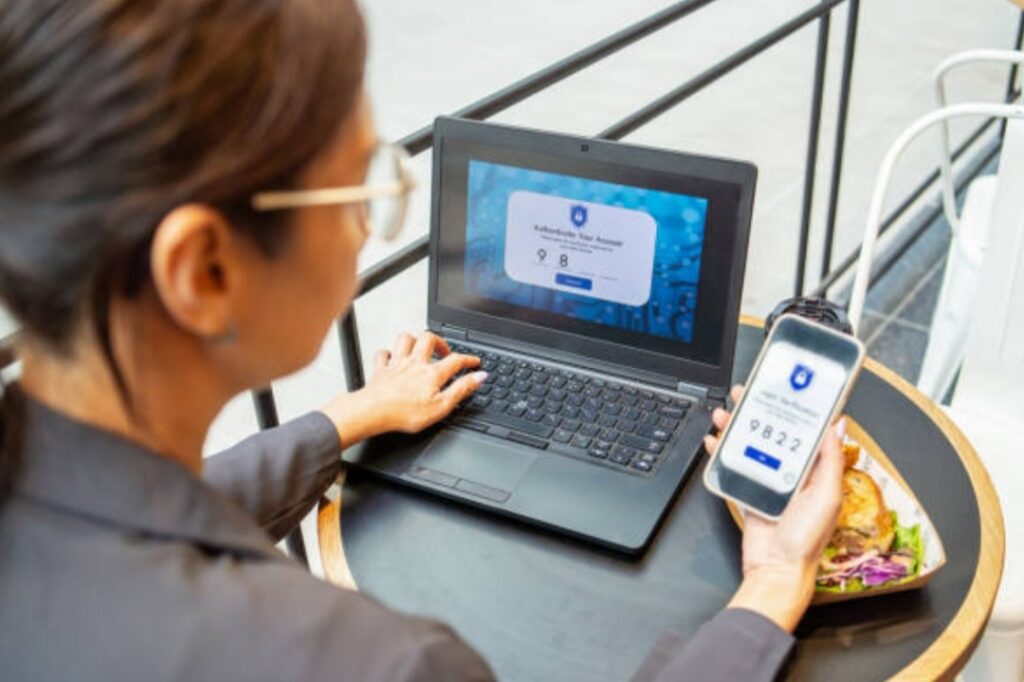
Yes — 2FA adds a crucial second layer of security.
Even if someone guesses your password, they still need your phone or email to get in.
✅ Always enable 2FA on:
- Banking apps
- Email accounts
- Cloud storage
- Social media
Use an app like Google Authenticator, Microsoft Authenticator, or Authy for better security than SMS.
✅ Stay Informed, Stay Secure
You don’t need to be a tech genius to protect yourself online.
All it takes is a few smart choices:
- Use strong, unique passwords
- Store them with a password manager
- Avoid common mistakes and outdated habits
- Stay updated on password best practices
The more you know, the safer your accounts will be.
Have a question not covered here? Drop it in the comments or check out our full guide on how to create strong passwords. Your security is just one decision away — make it today.
Final Thoughts — Protect Your Digital Life One Password at a Time 🔐🌐
In today’s fast-paced digital world, your passwords are your first and last line of defense.
Every email account, social profile, shopping site, cloud backup, and banking login you use is a doorway — and that doorway is protected by a password.
The question is: Are your passwords strong enough to keep the intruders out?
If you’ve ever wondered how to create strong passwords, feared being hacked, or felt overwhelmed by the complexity of digital security — now is the time to act.
Let’s recap what you’ve learned:
✅ What You Now Know:
- You understand the anatomy of a strong password — long, random, unique, and complex.
- You’ve learned clever ways to remember secure passwords using passphrases, acronyms, memory techniques, and visual triggers.
- You’ve explored password managers as the most efficient and secure solution for managing hundreds of login credentials.
- You’ve seen the most dangerous password mistakes and how to avoid them like a pro.
- You’ve even built a personal system to generate unique passwords on demand.
That’s not just good cybersecurity — that’s digital mastery.
🚨 Don’t Wait for a Breach to Take Action
Every day, hackers run automated scripts to break weak passwords.
Every week, another company faces a data breach.
And every month, millions of passwords are leaked, reused, or guessed because people think:
“It won’t happen to me.”
But the truth is:
If your passwords aren’t strong, private, and well-managed — it absolutely can happen to you.
🛡️ Your Next Step: Take Back Control
Now that you’re armed with real knowledge, it’s time to put it into action:
- 🔑 Update weak passwords today using passphrase techniques
- 🔐 Set up a password manager to store and generate future logins
- 📲 Enable two-factor authentication wherever possible
- 💡 Educate your family and team members — protect your circle
You don’t need to do it all in one day.
But you do need to start.
🚀 Your Security, Simplified — Starting Now
Securing your digital life doesn’t have to be a chore.
With the right habits, tools, and systems in place, you’ll never have to worry about:
- Forgotten logins
- Password breaches
- Reused credentials
- Sticky notes with “supersecret123” on them
Instead, you’ll be in full control — confident, protected, and future-proofed.
Take action now. Don’t leave your accounts wide open. Use the tips in this guide or start using a password manager today — and make your digital life truly secure, once and for all. 🔐
Ready to Level Up Your Online Security?
Bookmark this post 📌.
Share it with friends and family who still use weak passwords.
And most importantly — apply what you’ve learned.
Because digital safety isn’t just a tech thing —
It’s a you thing.
You might also like :